

Wanneer u vaak met Windows 11 werkt, is het u wellicht opgevallen dat er meerdere snelkoppelingen bestaan die verwijzen naar belangrijke mappen binnen Windows 11.
Deze shell-commando’s kunnen worden ingevoerd in Uitvoeren, de Verkenner of de Opdrachtprompt om een specifieke map in Windows te openen.
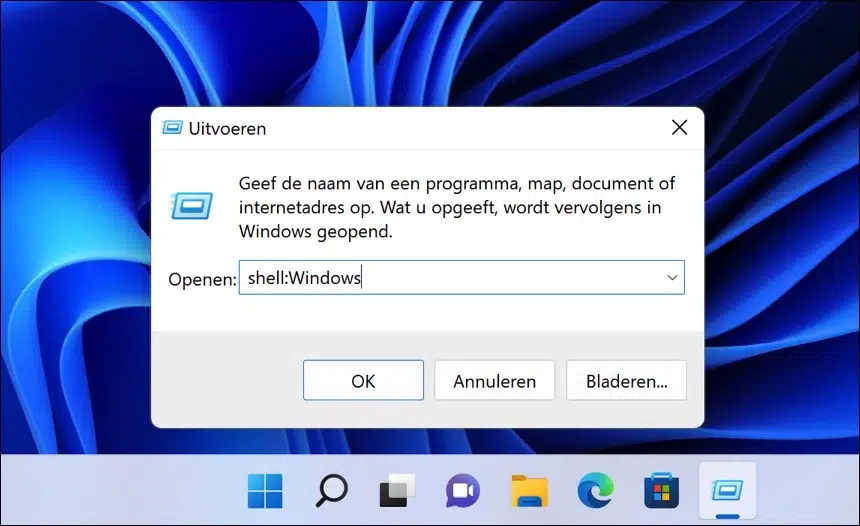
U heeft de mogelijkheid om shell-opdrachten te integreren in batchscripting of een andere programmeertaal.
Veel systeembeheerders maken gebruik van shell-commando’s als snelkoppelingen om mappen te openen. Het vergemakkelijkt het navigeren in Windows aanzienlijk als u weet welk shell-commando wat uitvoert.
Hierbij een opsomming van shell-opdrachten die u in Windows kunt toepassen. Ik heb ook opgenomen wat dit shell-commando precies doet.
Alle Shell (interactieve) commando’s voor Windows 11
| Beschrijving | Shell commando |
|---|---|
| Opent de “AccountPictures” map in uw gebruikersprofiel map. | shell:AccountPictures |
| Opent de map “Windows Tools”. | shell:Administrative Tools |
| Opent “een programma van het netwerk installeren”. | shell:AddNewProgramsFolder |
| Opent de “Appdata / Roaming” map in uw gebruikersprofiel. | shell:AppData |
| Opent de map “Application Shortcuts” in uw gebruikersprofiel. | shell:Application Shortcuts |
| Opent een venster met alle geïnstalleerde Windows updates via het configuratiescherm. | shell:AppUpdatesFolder |
| Opent de “Applications” map met snelkoppelingen naar alle geïnstalleerde apps. | shell:AppsFolder |
| Opent de map “Camera-album” in de Afbeeldingen gebruikersmap. | shell:Camera Roll |
| Opent alle Administrative Tools in Windows 11. | shell:Common Administrative Tools |
| Opent de INetCache map in het gebruikersprofiel. | shell:Cache |
| Opent de tijdelijke map voor branden in het gebruikersprofiel. | shell:CD Burning |
| Opent het venster “Programma’s verwijderen” via het configuratiescherm. | shell:ChangeRemoveProgramsFolder |
| Opent de map ProgramData. | shell:Common AppData |
| Opent de map Programma’s in het Startmenu. | shell:Common Programs |
| Opent de map Openbare afbeeldingen. | shell:CommonPictures |
| Opent het Openbaar bureaublad. | shell:Common Desktop |
| Opent Openbare documenten. | shell:Common Documents |
| Opent Openbare muziek. | shell:CommonMusic |
| Opent Openbare downloads. | shell:CommonDownloads |
| Opent de map Ringtones in Program Files. | shell:CommonRingtones |
| Opent Netwerkverbindingen. | shell:ConnectionsFolder |
| Opent Conflicten in het Synchronisatiecentrum. | shell:ConflictFolder |
| Opent Openbare video’s. | shell:CommonVideo |
| Opent Templates in ProgramData. | shell:Common Templates |
| Opent Opstarten in het Startmenu. | shell:Common Startup |
| Opent het Menu Start in Verkenner. | shell:Common Start Menu |
| Opent Contactpersonen. | shell:Contacts |
| Opent de Crypto map. | shell:CryptoKeys |
| Opent Credential Manager. | shell:CredentialManager |
| Opent Cookies (Low). | shell:Cookies\Low |
| Opent Cookies. | shell:Cookies |
| Opent alle onderdelen van het configuratiescherm. | shell:ControlPanelFolder |
| Opent Downloads. | shell:Downloads |
| Opent het Bureaublad. | shell:Desktop |
| Opent de Microsoft Protect map. | shell:dpapiKeys |
| Opent DeviceMetadataStore. | shell:Device Metadata Store |
| Opent Documenten (Bibliotheek). | shell:DocumentsLibrary |
| Opent Favorieten. | shell:Favorites |
| Opent Fonts. | shell:Fonts |
| Opent Game Explorer. | shell:GameTasks |
| Opent Geschiedenis. | shell:History |
| Opent Implicit App Shortcuts. | shell:ImplicitAppShortcuts |
| Opent LocalLow. | shell:LocalAppDataLow |
| Opent Local AppData. | shell:Local AppData |
| Opent Koppelingen. | shell:Links |
| Opent Bibliotheken. | shell:Libraries |
| Opent Deze pc. | shell:MyComputerFolder |
| Opent Muziek (Bibliotheek). | shell:MusicLibrary |
| Opent Video’s. | shell:My Video |
| Opent Afbeeldingen. | shell:My Pictures |
| Opent Muziek. | shell:My Music |
| Opent Netwerk-snelkoppelingen. | shell:NetHood |
| Opent Netwerken. | shell:NetworkPlacesFolder |
| Opent Documenten. | shell:Personal |
| Opent het gebruikersprofiel. | shell:Profile |
| Opent Afbeeldingen (Bibliotheek). | shell:PicturesLibrary |
| Opent Printers. | shell:PrintersFolder |
| Opent Printer-snelkoppelingen. | shell:PrintHood |
| Opent Common Files. | shell:ProgramFilesCommon |
| Opent Program Files. | shell:ProgramFiles |
| Opent Program Files (x64) Common. | shell:ProgramFilesCommonX64 |
| Opent Program Files (x86) Common. | shell:ProgramFilesCommonX86 |
| Opent Program Files (x86). | shell:ProgramFilesX86 |
| Opent Programma’s. | shell:Programs |
| Opent Openbaar. | shell:Public |
| Opent Prullenbak. | shell:RecycleBinFolder |
| Opent Recent gebruikte items. | shell:Recent |
| Opent Opstarten. | shell:Startup |
| Opent Synchronisatiecentrum. | shell:SyncCenterFolder |
| Opent System32. | shell:System |
| Opent Templates. | shell:Templates |
| Opent Windows-map. | shell:Windows |
Ik vertrouw erop dat u nu een beter inzicht heeft in de shell commando’s die u voor diverse doeleinden in Windows 11 kunt gebruiken. De meeste van deze commando’s zijn ook toepasbaar in Windows 10.
Ik hoop u hiermee geholpen te hebben. Bedankt voor het lezen!
